


Invoice Automation Then and Now: From Zonal OCR to a Single Step
How invoice extraction went from a two-to-three person-year OCR and template pipeline to a single model-driven step — comparable accuracy, no per-vendor setup.


Why did invoice extraction take two to three person-years to build?
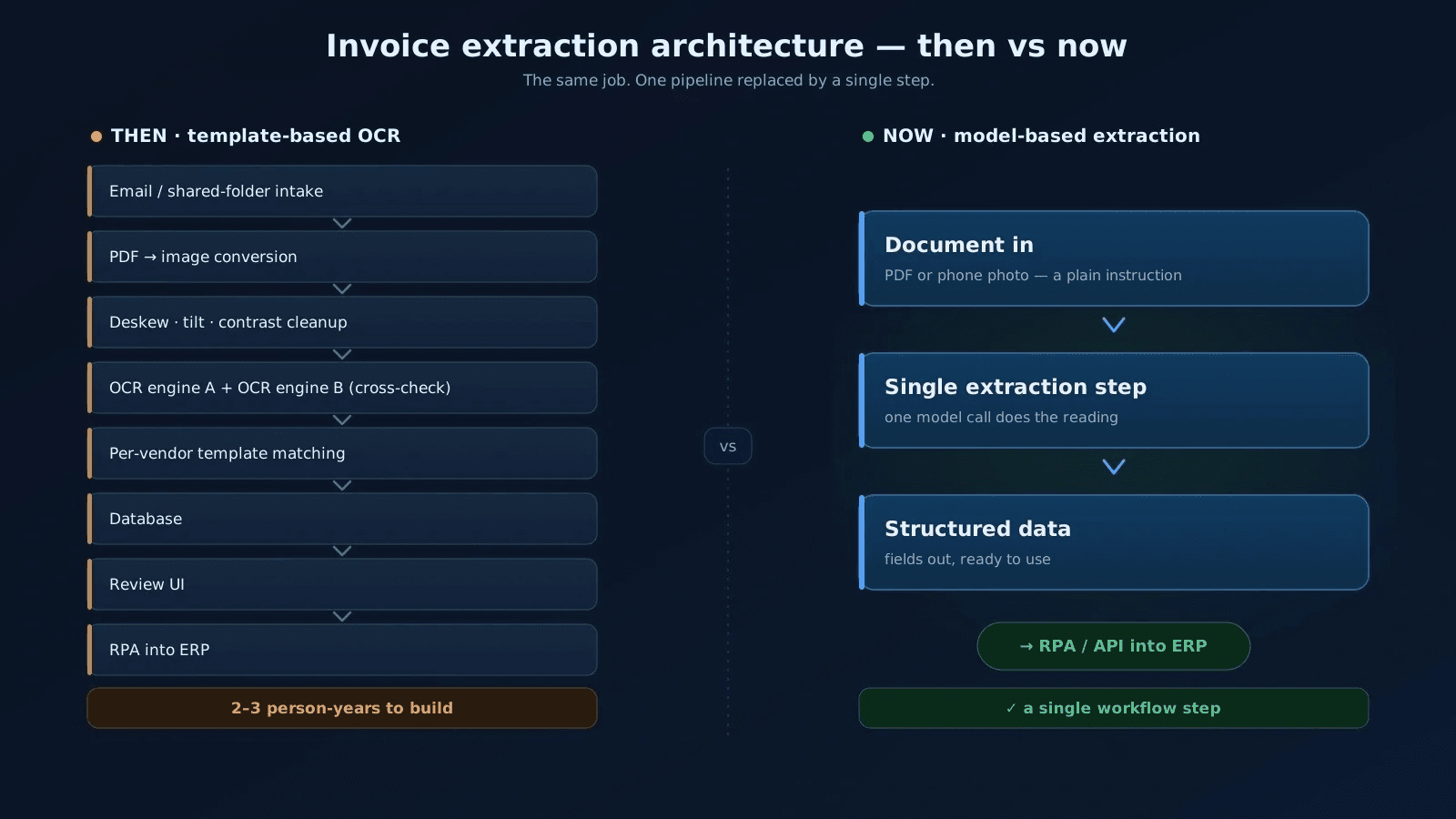
Six or seven years ago we built an invoice processing engine the only way it could be built at the time. It worked. 99%+ accuracy per field, and at one point 100% on our full test sample. I was proud of it, and I still am. It also cost two to three person-years to build. And it made every one of our users do work that nobody should have to do.
Today that entire extraction engine is one step in a workflow, driven by a plain instruction to a language model. The accuracy is comparable. The setup work for a new vendor has not been reduced – it has disappeared. This article is about the difference between those two architectures, what each one cost, and what you still have to get right. If you want the story of how our own accounting automation came together, that is a separate article and I will not retell it here.
VISERA was always a fully automated invoice processing solution – from the arriving document all the way into the ERP and the accounting records. Invoices came in by email, from a shared folder, or both. What happened between arrival and posting is where the two to three person-years went.
Why every PDF had to be converted into an image first
We started with two separate processing paths. One for native PDFs, which looked easier because the text is already there, and one for scans. That split did not survive contact with real documents. Native PDFs regularly carried their most important data inside a picture-based letterhead – including the tax number.
The tax number was the single most important field on the page. It identifies the vendor, and the vendor decides which template applies. So nothing else in the pipeline could proceed until the tax number was read correctly. We went as far as supporting tax number formats and control digit checks for dozens of countries. In the end we unified the two paths: every document, PDFs included, was converted into an image and processed exactly the same way.
Why the old pipeline ran two OCR engines against each other
Before any text could be read, the image went through a sequence of computer vision steps: deskewing, tilt and angle correction, conversion to black and white, contrast enhancement. None of this added business value. All of it existed to give the OCR engines the cleanest possible input.
Initially we ran two OCR engines in parallel and cross-checked their output. Two independent readings maximise the chance of getting each piece of data right – that was the theory, and it held. Later we dropped to a single engine, because we had reached sufficient accuracy without the second one. The second one was also costing us twice: it complicated the technology stack, and being cloud-based it charged per use. A usage-based cost inside a product sold for a fixed annual fee is a planning problem. I will come back to that.
What per-vendor templates cost the customer, forever
To raise accuracy further we used per-vendor templates. A template told the algorithm roughly where to look for each piece of data – relative to the top or bottom of the page – in what format, and under which label. That in turn meant supporting every plausible date format for invoice dates, due dates and the rest.
And it meant something less pleasant. Somebody had to build that template: manually select the label and value pair for every field we wanted to extract. We absorbed that work ourselves for known vendors during implementation. But for every new business partner the customer acquired afterwards, the end user had to do it.
Template setup took minutes. That was never the problem. The problem is that it was a step at all – a piece of configuration work the customer inherited forever, growing with every new supplier they ever signed.
Everything the old system needed besides extraction
Extraction was only the middle of the system. There was a user interface showing a table of processed invoices with all their extracted data, for quick sanity checks and export, which meant a database underneath it. And the extracted data had to end up inside the ERP or accounting software. That part we did with robotic process automation. This integration layer remains core to our enterprise accounting automation service.
The first version of all this used a remarkable number of different technologies: one language for the processing logic and image preprocessing, two separate OCR engines, a relational database, a separate front-end platform and a commercial RPA tool. Installing and maintaining that was a nightmare. We eventually consolidated almost everything onto a single language and kept the database. That consolidation was not a refinement. It was damage control on a stack that had grown because each capability needed its own specialist tool.
What does 99% accuracy in invoice data extraction actually mean?
What did 99%+ accuracy actually mean? Per field, under a strict definition. Each piece of data – invoice number, invoice date, due date, total amount, VAT, reference number – had to be perfectly extracted, or it counted as wrong. There were no partial credits.
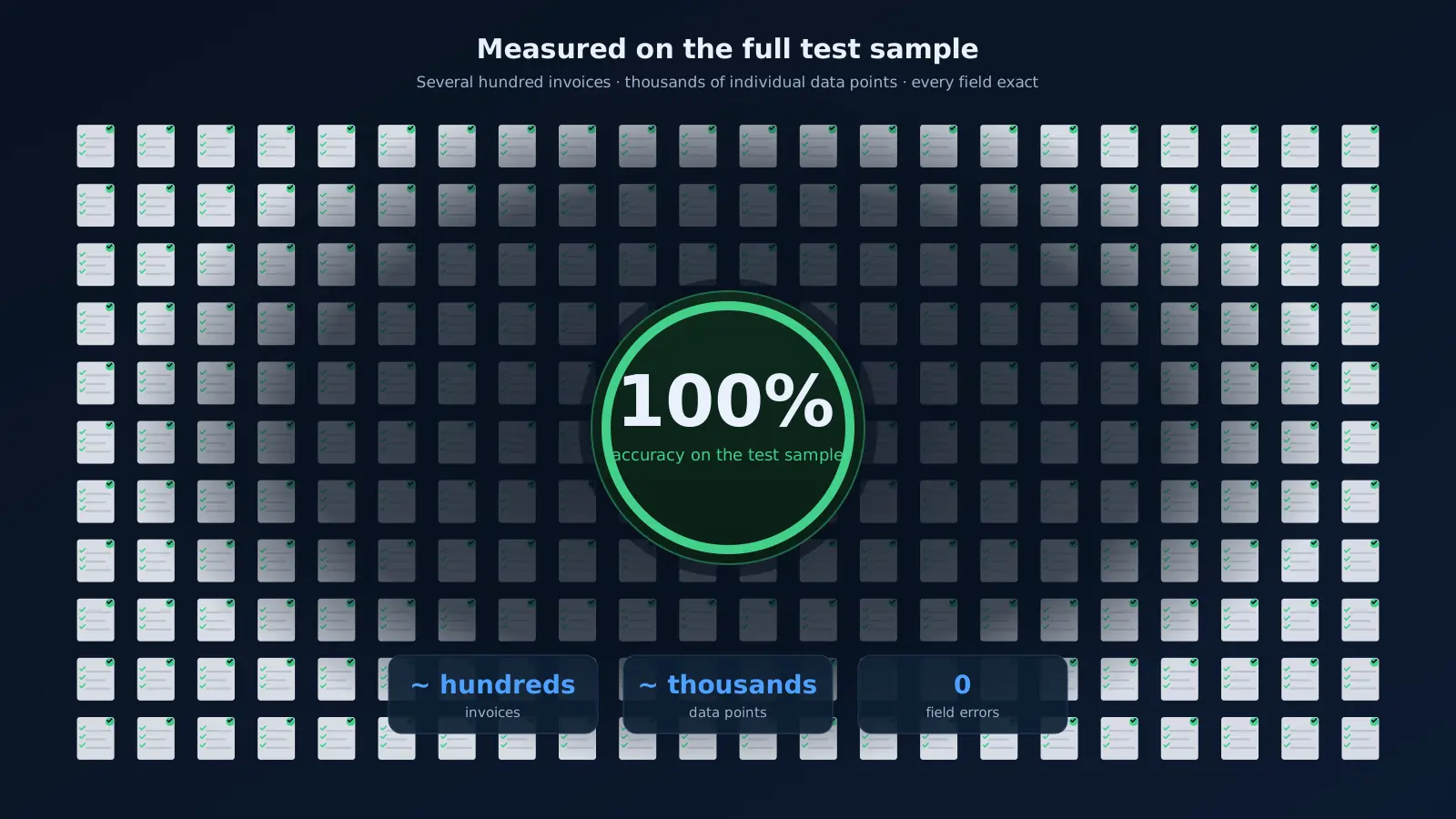
We measured against a sample of several hundred invoices, drawn from our own documents and from our clients' documents. Those invoices contained literally thousands of individual data points, so the sample served as a regression test suite as well as an accuracy benchmark. At one point we achieved 100% accuracy across that whole sample. That remains one of the things I am proudest of from that era.
When a field failed a check, the algorithm never stopped. It left the field empty, or notified the user when it was confident something had gone wrong. Which meant our users received a lot of email from us.
Which documents a template-based approach could never handle
The limits were not failures of execution. They were the direct consequence of an approach built on fixed coordinates and pixel quality:
- Photographs were out. Documents had to be properly scanned – straight, 300 DPI. A picture taken with a phone was not a supported input.
- One document per image. Several invoices on the same scan was not something a coordinate-based template could make sense of.
- No line items and no multiple accounts. The invoice total was posted to a single account in the ERP. That was the end of the discussion.
- Every new vendor required a human to define a template before their first invoice could be processed automatically.
How does invoice extraction work now that a model does the reading?
Today the pipeline runs in a low-code automation platform, and most of the logic in it is accounting RPA – the part of accounts payable automation that gets data into the systems of record. Invoice extraction, the part that took two to three person-years to build, is now a single step. Two, strictly speaking, because images and PDFs run through separate branches.
You feed the document in with a simple instruction describing what you want extracted. What comes out is structured data that the automation downstream consumes directly – typing it into legacy systems where that is the only way in, or calling an API where a modern one exists.
Everything described in the previous section – the image conversion, the deskewing, the contrast correction, the dual OCR engines, the per-vendor templates, the label-value mapping, the date format catalogue – is gone. Not optimised. Gone.
Which verification checks still run, and why we do not validate VAT rates
Does that mean trusting the output blindly? No. We still verify tax number control digits, and we still check that the sums on the document add up. Those are cheap, deterministic checks, and they catch a real class of error.
We deliberately do not validate VAT rates. Invoices arrive from many countries, each with several applicable rates. A rate table of that shape is a maintenance liability that would fail in exactly the situations it was meant to protect. Checking an arithmetic identity is reliable. Checking a number against a table of foreign tax policy is a promise you have to keep updated forever, and we chose not to make it.
Is accuracy as good without templates?
In production we see accuracy of the same order as before – the 99% range. A model can still get something wrong occasionally, in much the same circumstances a person would: an invoice faded in the sun, or a handwritten note scrawled across a critical field. That is genuinely hard for humans and machines alike, and I would be suspicious of anyone claiming otherwise.
The headline is not that accuracy improved. It is that comparable accuracy now arrives with no template work, no per-vendor onboarding, and none of the computer vision scaffolding underneath it.
Which invoices can be processed now that could not be processed before?
The interesting part of this shift is not that the old capabilities got cheaper. It is that an entire category of document that used to sit outside the system is now inside it.
Phone photos of paper receipts, running in production
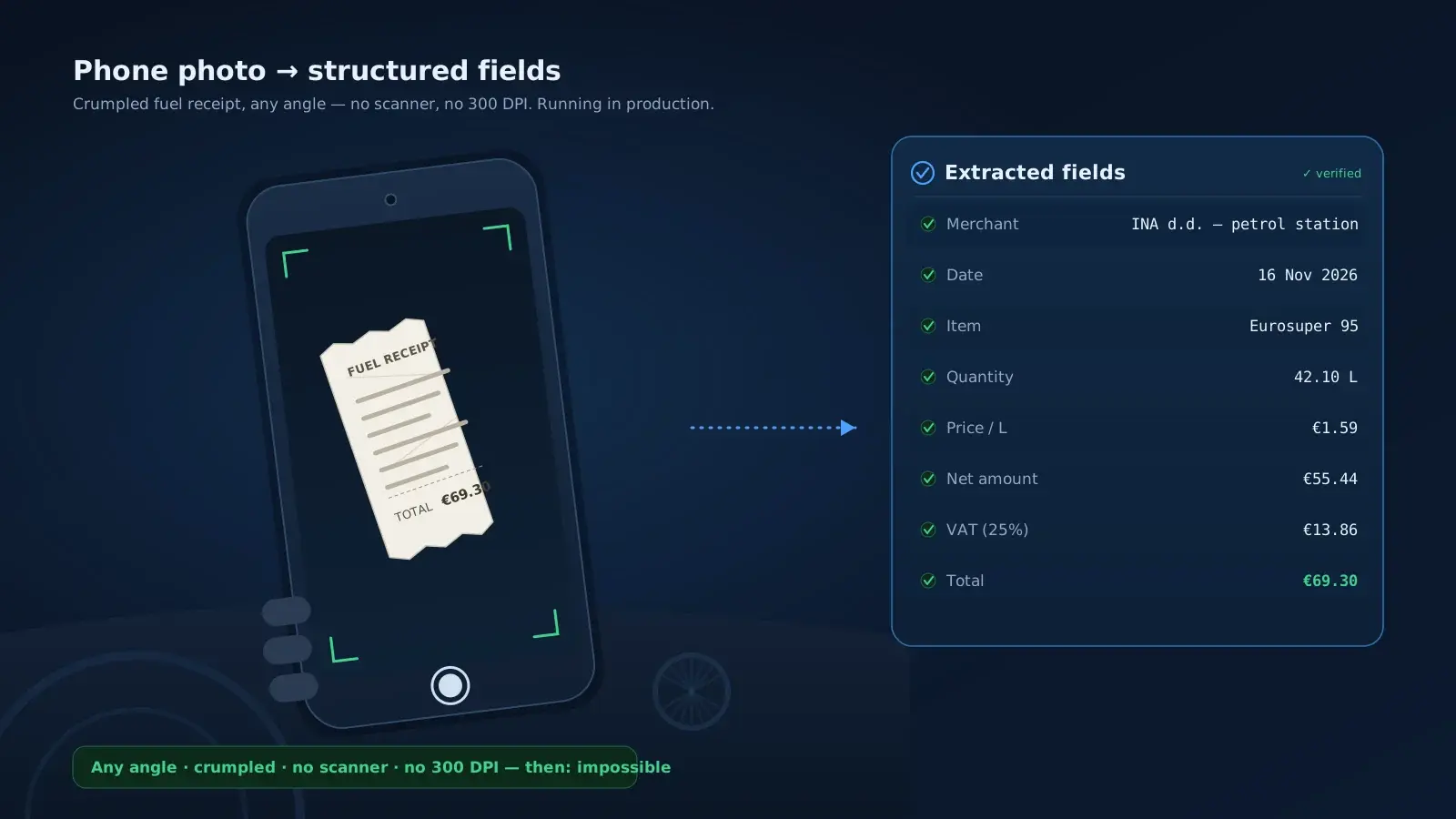
Croatia introduced fiscalisation, so most domestic invoices now arrive by email in a standardised format. But if someone pays on the spot with a corporate card – fuel for a company car, for example – they still walk away with a piece of paper. Those get photographed with a phone and sent to the invoice processing address. No scanner, no 300 DPI requirement, no angle correction. This runs in production.
Several invoices in a single photograph
A model has no difficulty telling several separate invoices apart in the same image. That is how we process travel expense documentation, where a trip generates a handful of small receipts – tolls, vignettes, a hotel bill – that nobody is going to scan individually. We have written about the travel expense agent separately; this is the extraction layer underneath it.
Line items and chart-of-accounts selection
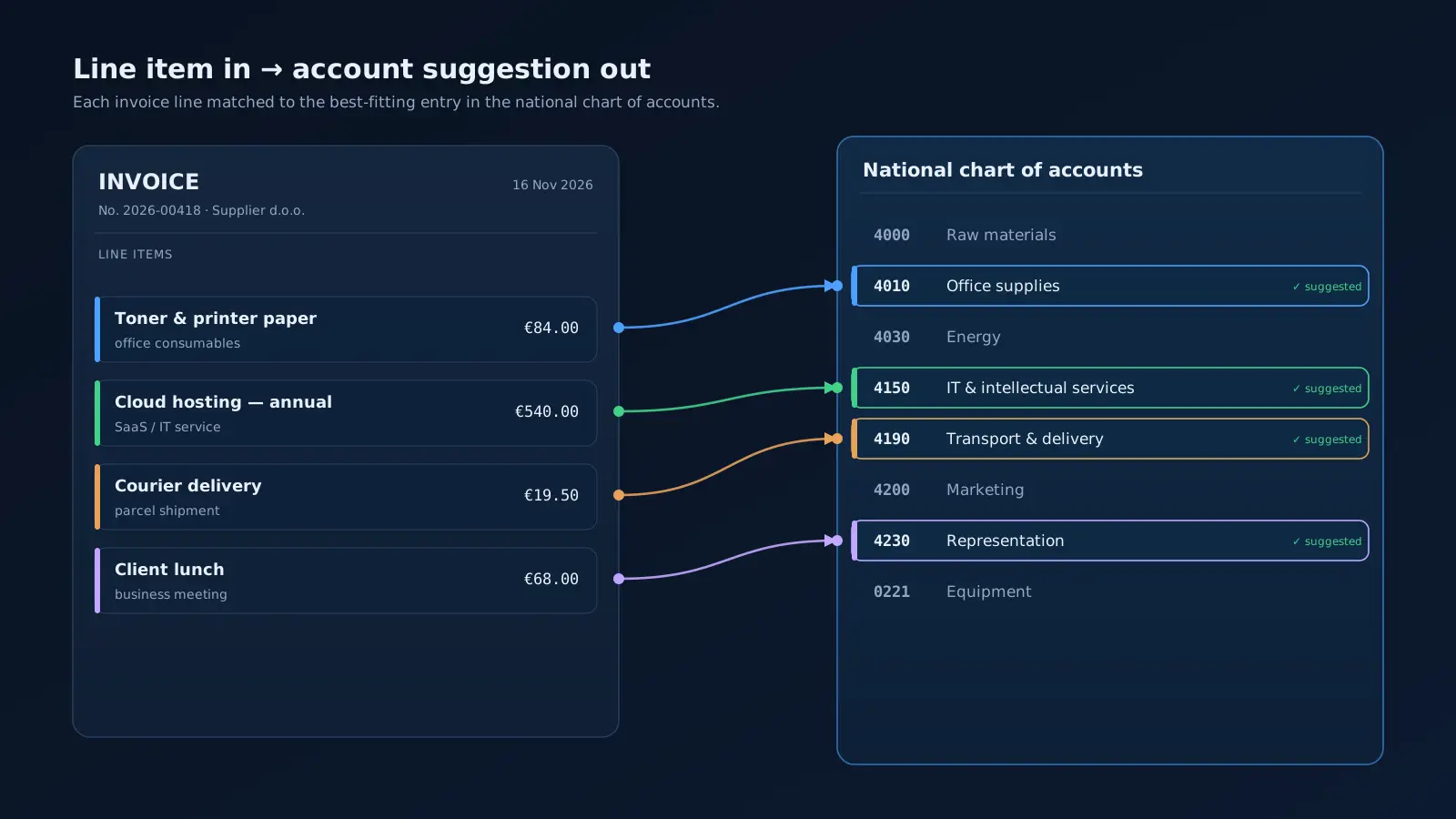
The old system posted a total to a single account. The current one can process individual line items and propose the most appropriate account for each. The mechanism is almost disappointingly simple: take the description of the line item, give the model the national chart of accounts, and ask which account fits best.
That capability is built and demonstrated. It is not switched on for every user, because the organisations currently running the solution post at invoice level and do not need it. It is there the moment a client's posting rules require it.
Should you build a separate path for structured XML e-invoices?
Here is the result I did not expect. We now receive proper structured XML e-invoices for most domestic documents. Structured data is strictly better input than a picture of a document – that is the whole premise of e-invoicing.
So did we build a separate path for it? No. The PDF and image extraction works well enough already. Adding XML parsing would mean a second code path, a second set of failure modes and a second thing to update whenever a format version changes. All in exchange for an accuracy improvement we would struggle to measure.
Every data engineering instinct says parse the structured feed. The honest engineering answer was that the generic path was already good enough, and a second path is a permanent cost.
What does it cost to process one invoice — and what actually changed?
People expect the cost story to be dramatic. It is not. What the third-party services charge us per invoice – the cloud OCR engine then, the language model API now – was a fraction of a cent then, and it is a fraction of a cent now.
What changed is predictability, and that mattered far more than the unit price. Six or seven years ago we sold software the traditional way: a licence plus a yearly maintenance fee. The cloud OCR engine inside that product charged per use. So a client who processed many thousands of invoices could consume a meaningful share of what their maintenance fee was supposed to cover. Estimation and pricing became genuinely frustrating. We were absorbing a variable cost under a fixed price.
Now that the whole industry has moved to subscription and usage-based models, the arithmetic is transparent. Model calls are a line item in the cost base, and the client's invoice reflects what was actually consumed. The technology change gets the attention. The commercial model change is what made the economics sane.
What goes wrong when organisations automate invoice processing?
The barrier to entry has collapsed. Anyone can send a document to a model and get fields back. That is a real democratisation, and I am not going to pretend otherwise. It is also where most of the disappointments will come from, because the extraction step was never the hard part of accounting automation. Here is what I would watch:
- Trusting extracted data without verification. Run control digit and sum checks. They are cheap and they catch real errors.
- Letting the automation pay rather than record. Posting a document and settling a liability are different categories of risk, and they deserve different levels of human involvement.
- Automating a messy process exactly as it stands. If the approval chain made no sense manually, it will make no sense faster.
- Sending invoices to a model without deciding where that data goes. Supplier pricing and payment terms are commercially sensitive. That is a decision to make before the first document, not after the first audit.
- Assuming extraction is the project. The hard part is the other side: posting rules, chart of accounts, approval workflows, and getting data into systems whose only interface is a screen built in another decade.
- Underestimating what high accuracy still requires. Prompt design and model selection are now the skills that separate 99% from something much worse. The tooling is accessible; the judgement about how to use it is not automatic.
Template-based OCR extraction versus model-based extraction
| Template-based OCR | Model-based extraction | |
|---|---|---|
| Setup for a new vendor | Manual template and label mapping | None |
| Image preparation | Straightening, contrast, black and white | Not required |
| Phone photos | Not supported; 300 DPI scans only | In production |
| Several invoices in one image | Not supported | In production |
| Line items | Total posted to a single account | Per-line account proposed |
| Per-field accuracy | 99%+ | 99% range in production |
| Third-party API cost per invoice | A fraction of a cent | A fraction of a cent |
| Build effort | 2–3 person-years | A single workflow step |
What VISERA 2.0 Disruptor is today, and what the pattern means elsewhere
VISERA 2.0 Disruptor is the current VISERA, and it is exactly the architecture described above: extraction as a single workflow step, structured output, verification checks, RPA or API into the systems of record. The product did not get an incremental upgrade. The expensive half of it stopped being necessary. That is the pattern worth taking away, and it is not confined to invoices. A capability that justified an EU-funded innovation project, two people for a year and a specialist technology stack is now a step in a workflow. At VIS Solutions we have moved that engineering value out of extraction, and into knowing what to check, what to automate, what to leave to a person, and how to connect any of it to the systems a business actually runs on.
So ask yourself one question about your own accounts payable: is there still a step where somebody maps fields for every new supplier? Next month I am closing this series with the bigger picture: how AI agents have changed the way our own company works, across every one of the processes we have written about this year.
Subscribe to the newsletter if you want it when it lands. And if you would rather talk about what this looks like on your own invoice volumes, get in touch.
Frequently asked questions
Answers to the most frequently asked questions.
No separate OCR layer is required. The old pipeline needed image conversion, straightening, contrast correction and an OCR engine – two of them, until we dropped the cross-checking second one. The current pipeline takes the document with a plain instruction and gives structured data back. OCR engines still have narrow uses, but they are no longer the backbone of accounts payable automation.
Nothing happens. The old architecture needed a per-vendor template telling the algorithm roughly where each field sat, so a redesigned invoice broke extraction until somebody remapped the labels. Template setup only took minutes, but it was a step the customer inherited forever, and it grew with every supplier they signed. That step no longer exists.
Yes, and in practice that is the harder half of the work. Extraction produces structured data, and the automation layer either calls an API where a modern one exists or types the data into the screen where that is the only way in. Posting rules, approval chains and chart-of-accounts mapping are where most of the project effort actually goes.
It is a decision you make deliberately before the first document, not after the first audit. Supplier pricing and payment terms are commercially sensitive, so where the data goes, who may retain it and under which contract are architecture questions, not procurement afterthoughts.
We separate recording from paying. Posting a document and settling a liability are different categories of risk, and they deserve different levels of human involvement, so our automation records and proposes while payment stays a human decision. That line is a design choice.
Classic invoice OCR reads characters at known positions and relies on per-vendor templates to know what those characters mean. Intelligent document processing interprets the document, so it copes with a phone photo, several receipts in one image, or a layout it has never seen before. The verification layer – control digit and sum checks – stays either way.
Tags