


Three Weeks of Engineering, or One Sentence Into a Chat Box
Turn a simple travel message into a completed expense report. See how VIS combines LLM extraction, deterministic rules and automation to eliminate repetitive manual work.


Can a travel expense report be filed with a single sentence?
If you travel a lot, you know the utopian ideal. All the documentation sorted out from one simple instruction:
"I attended https://megaconference.ai in Vienna last week. I left on Tuesday at 4PM and returned on Thursday at 9PM. I used the company car, the mileage at the end of the trip was approximately 42.757km."
Until just a few years ago, getting that meant specialised expense report automation software, trained personnel, or both. And that stuff costs.
This article is the entry point to a series on our corporate assistant. Travel expense report automation is one capability inside that assistant, and it is the easiest one to explain. Everybody who has ever filed an expense report already understands the problem.
Why is a travel expense report harder to automate than it looks?
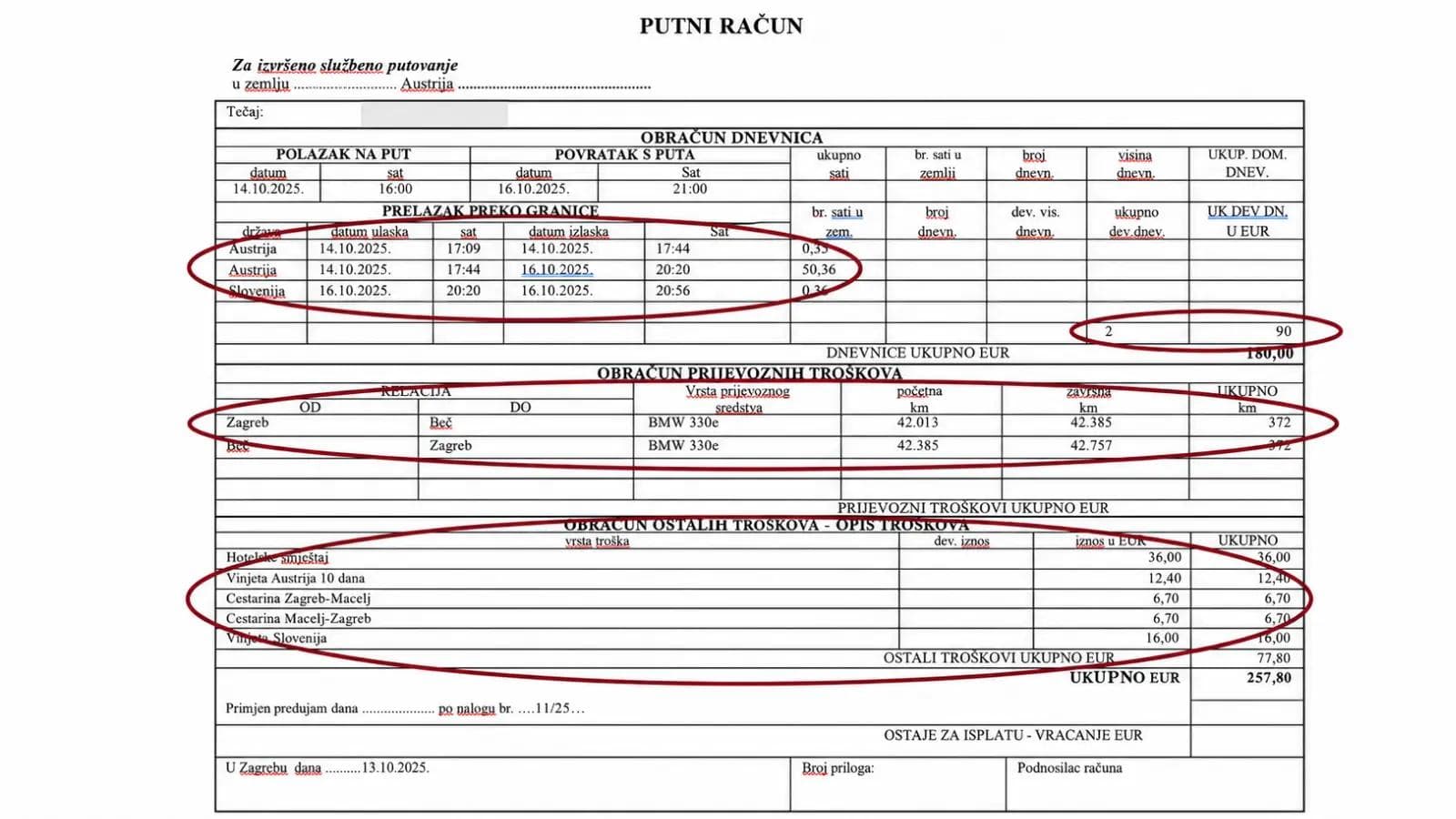
The full filled-in Croatian travel expense form with red annotation ellipses marking every field an agent must derive: border-crossing times, per-diem count, route and odometer readings, itemised costs. Real data must be redacted or replaced with sample values before publication.
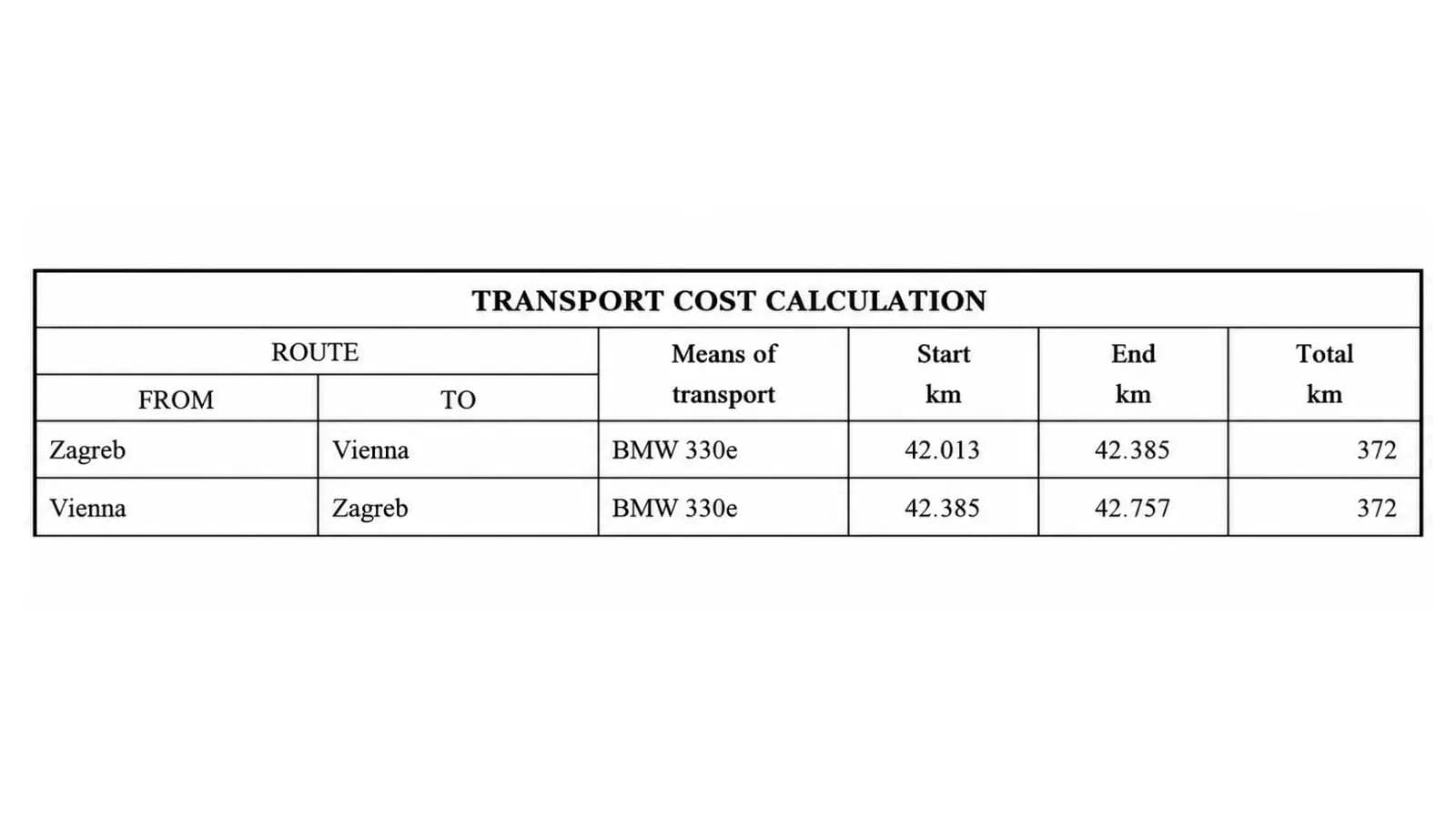
Close-up of the TRANSPORT COST CALCULATION table: two route rows Zagreb–Vienna and Vienna–Zagreb, start/end odometer readings and 372 km per leg — the illustration of why the end-of-trip odometer reading is sufficient input. Odometer readings and vehicle model to be replaced with sample values.
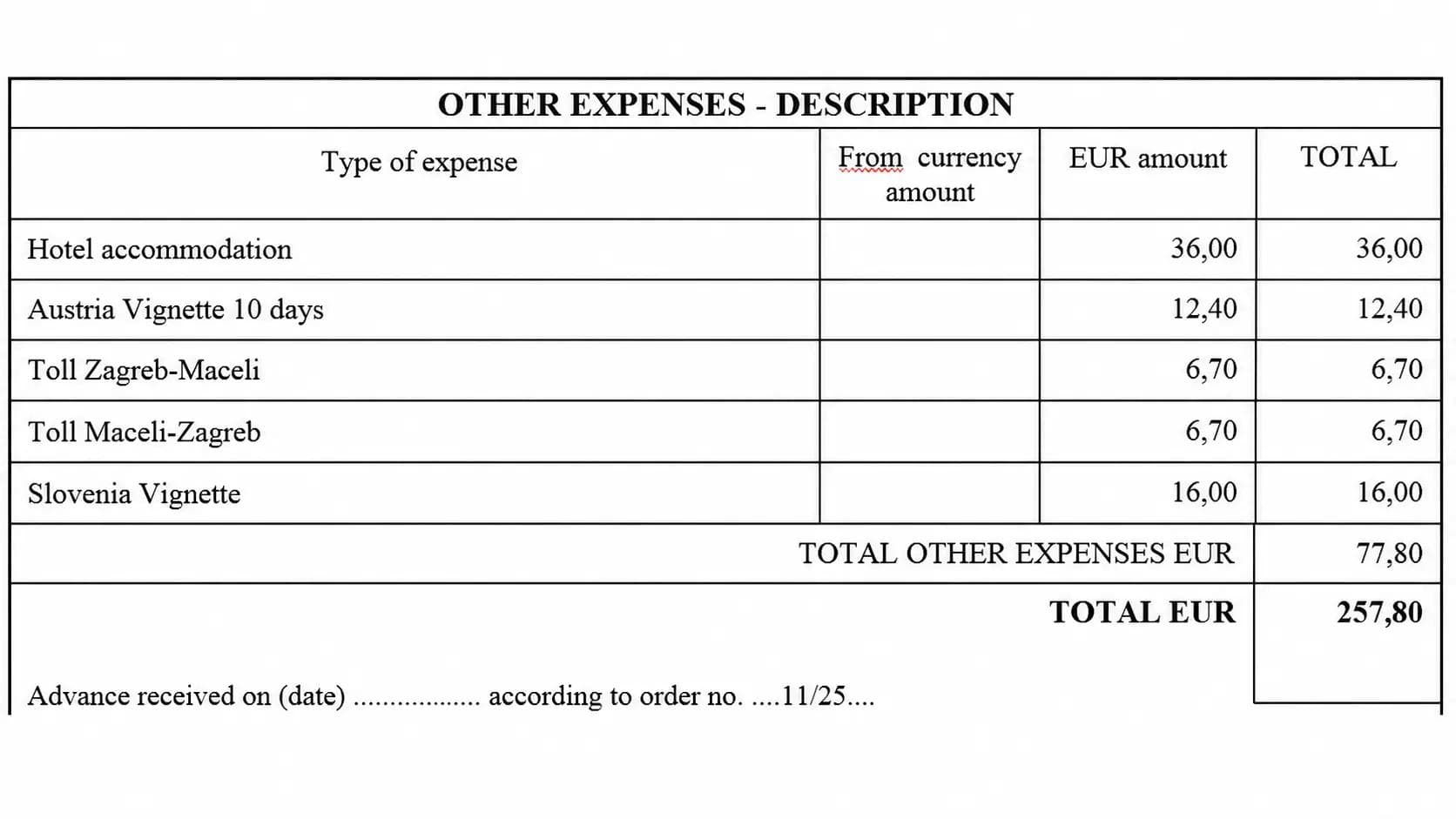
Close-up of the OTHER EXPENSES section: five itemised lines (hotel, Austrian 10-day vignette, two tolls, Slovenian vignette) totalling 77.80 EUR and a grand total of 257.80 EUR — the last manual step, somebody reading each attached invoice, describing it and summing it. Amounts to be sample values.
For some reason, the regulator forces us to record the car's mileage at the beginning and end of every route. People tend to forget about that, so this piece of data is simply missing. Luckily it can be reconstructed: take the mileage at the end of the trip and subtract the distance of each route.
And that is actually the easy part. For reasons only a bureaucratic mind can understand, the calculation of time only starts when you cross the national border. What happens if the border is hours away – I really don't know. In this example it luckily isn't.
Of course, if you drive you can't write down the exact time you crossed the border. Especially now in Europe, where you don't even stop at it. So you use more mental gymnastics. You take the average speed or the typical time to the final destination, you get the distance to the border from Via Michelin or Google Maps, and you calculate the approximate crossing time. To make stuff even worse, we have to do it for every country we cross.
By the way, if you find a mistake in the calculation of hours spent abroad in the form shown here, I'll buy you a beer. Another testament to how difficult such calculations are for humans. Luckily, in this case the mistake didn't influence the total amount, so everything was in line with regulations.
How do per diem allowance tiers actually work?
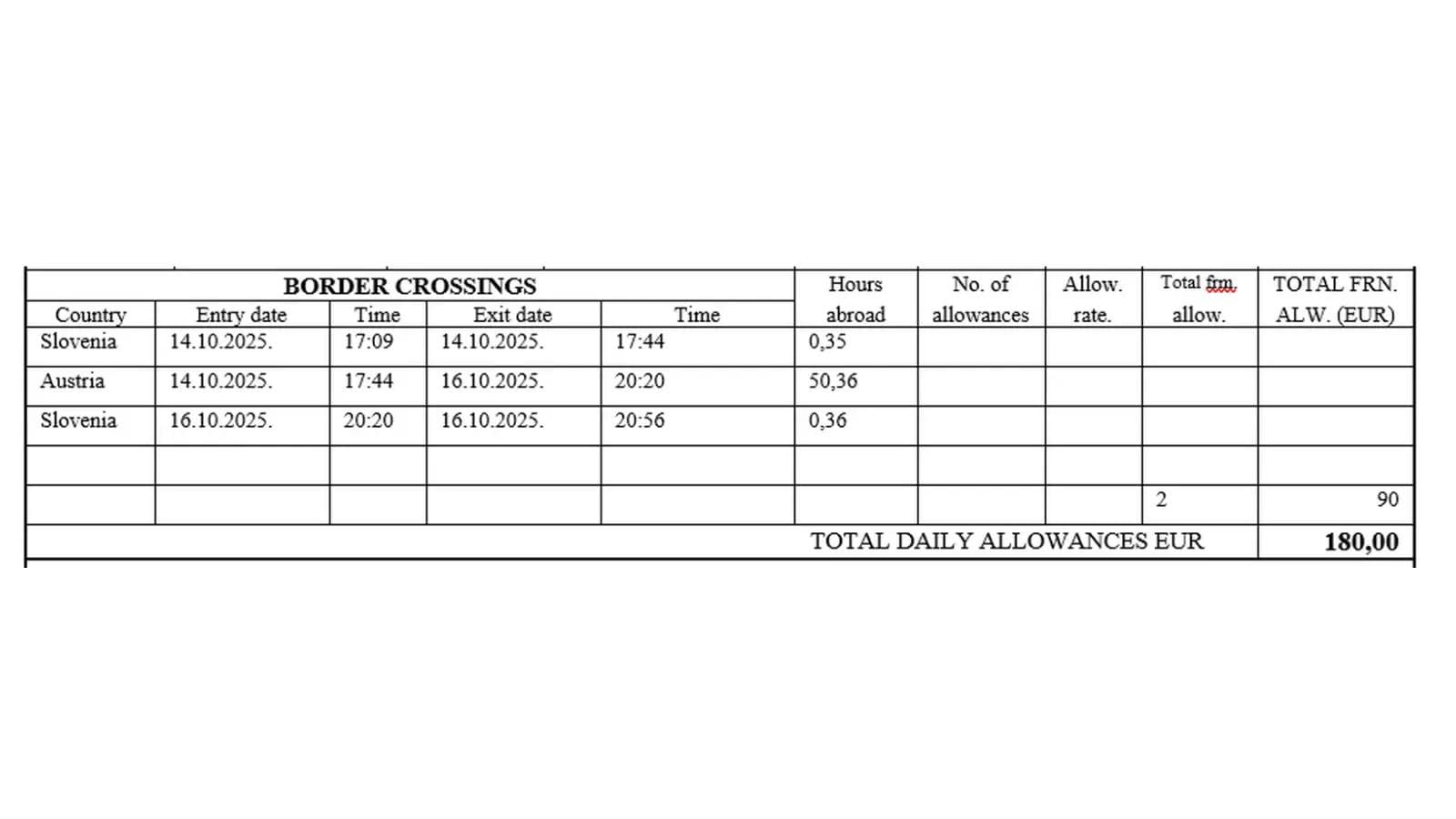
Close-up of the BORDER CROSSINGS block: three crossing rows (Slovenia 0.35 h, Austria 50.36 h, Slovenia 0.36 h) with entry/exit dates and times resolving to 2 allowances at a 90 EUR rate = 180.00 EUR. This is the single best picture of the article's core argument. Dates/times/amounts to be sample values.
Architecture schematic to be produced: chat UI (desktop + mobile, authentication, per-user filtration) → FastAPI → Python application; branch to GPT-4o for extraction only (chat text + photographed bills) and to the deterministic rules engine (Google Maps / Via Michelin distance calls, border-time estimation, mileage back-calculation, allowance tiering, per-country rate file); outputs the filled MS Word document and a PostgreSQL record feeding search and analytics. Draw a visible fence between the LLM box and everything numeric.
Screenshot of the chat interface on a mobile phone showing the unstructured instruction being typed ('I attended a conference in Vienna last week, left Tuesday 4PM, returned Thursday 9PM, company car, final mileage ~42,757 km') and the assistant's follow-up question for a missing required field. Redacted / sample data.
Is the daily allowance any simpler? Not really. The tiering is the same rule applied per 24-hour block: under 8 hours abroad, no allowance; 8 to 12 hours, half an allowance; over 12 hours, a full one. That is why the thresholds for the third day are 48, 56 and 60 hours – subtract 48 and you are back to 8 and 12. In the example trip, a couple of hours above 48 hours rounds up to 2 daily allowances. Between 56 and 60 hours it would be 2.5. Over 60 – 3. "Intuitive", isn't it?
The complexity doesn't end here. The daily allowance is 90 euros – for Austria. For other countries the rates can be different. This is another part where I have seen people make mistakes. They simply copy-paste unit amounts from previous reports, even for countries with different allowance rates.
Even that is not the end – we have to add the other expenses. Once again, somebody has to go through all the invoices attached to the expense report, describe them, and sum up the amounts.
What does the manual process really cost — the hour or the wait?
Filling one report manually took perhaps an hour or two. I know because I filled quite a few of them myself, and I adjusted the figure upward slightly, because the students doing it were less trained and less experienced than I was.
But the hour was never the expensive part. The expensive part was the lag. There is no legal deadline for submitting a travel expense report, so it is a low-priority task for whoever owns it. With a backlog, higher-priority work and absences, the student would sometimes start generating a report weeks after the trip. And then come the painful questions – when exactly was the departure flight? That is something you no longer remember weeks later. Sometimes you had to bounce the pain back: somebody has to look it up on the plane ticket, so why shouldn't that be you instead of me?
Weeks-long lags are normal even with a human assistant. What the workflow removes is the second wait, not the first. You may still get around to asking for the report weeks after the trip. But once you ask, the report exists in minutes instead of after another few weeks in somebody else's queue.
Why was expense report automation not worth doing before LLMs?
In some cases, even that wasn't enough. We used university students for administrative work, and they required training. When a student left, the new one required training again. In other words, I was forced to work through the first few travel expense reports with them until they figured it out.
Since I got tired of teaching the same old skill to new people, I wondered whether you could automate travel expense reports painlessly. Just a few years ago the answer would be clear. You can automate a lot of it, but not painlessly.
You would have to develop an application that is not so straightforward, and that required a lot more time before the vibe coding era. Even then, before LLMs the unstructured message from the introduction just wouldn't do. You would probably need to enter a few more details in a structured data entry form, such as exact dates and times. No formulations like "Tuesday last week".
But we didn't want to train people to use a new app instead of training them how to file the report in MS Word. So the real question was how to automate expense reports without new software for anybody to learn. We wanted that simple, unstructured instruction, because it already contains all the data we need. Why would an employee need to know more than where she was, when, and how she travelled there?
What does the travel expense automation workflow actually consist of?
The front end is a custom responsive web interface, built with agentic coding, and it works from a computer or a mobile phone. It is chat based. It takes instructions in exactly the unstructured format an employee would use when asking a specialist to prepare the report. It is not a standalone application either – it is part of the corporate assistant, with real authentication and per-user data filtration. One traveller's reports stay separate from everyone else's. This pattern – extracting structured requirements from natural language, then applying deterministic rules – is exactly how we built this workflow at VIS Solutions.
Behind a FastAPI interface sits a Python application. The model – GPT-4o – does one job: extraction. It pulls departure time, return time and final mileage out of the chat message. You can also attach bills to the chat, for example a taxi from the airport to the hotel, and the model extracts those line items too, from photographs.
Why the LLM does no arithmetic at all
This is the design decision that matters most:
This is the design decision that matters most. We built this workflow to follow a clear principle: the AI absolutely does no maths. Travel expense calculation is strictly rule based and should be implemented that way. The LLM's role is only to extract structured data from unstructured input, such as a chat message or photos of bills for travel costs.
Everything numeric is deterministic Python following the regulatory specification. It reconstructs the per-leg odometer readings by subtracting known route distances from the final mileage. It estimates border-crossing times from Google Maps / Via Michelin distances and average speed. It counts allowances against the 8 / 8–12 / 12+ tiering, applies the per-country rate, and sums the other expenses.
Per-country daily allowance rates live in a file, originally created by scraping the web, and can be changed there without touching the algorithm. The tiering logic itself sits in the Python algorithm, which is appropriate: the limits are numbers that might move, but the shape of the rule rarely does. That is what per diem allowance calculation automation looks like in practice – rates in a file, rules in code.
What comes out: a signed-off Word form and a queryable expense record
Two things. The filled MS Word form in its final version, which is the artefact that precedes payment. And a structured record of every travel expense written to a PostgreSQL database. That not only makes searching previous reports easier, it is also the basis for travel expense analytics.
If required data is missing from your first message, the solution comes back and asks you to fill the gap. Whether that check lives in the Python required-field validation or in the model was deliberately never inspected – see the next section for why.
Is this an AI agent or an AI workflow?
Probably not, and I am careful about this. By the terminology used in the Claude Architect certification material, the correct name for this is an AI workflow rather than an agent. It is a fixed pipeline with an LLM extraction step and a deterministic rules engine, not a loop that chooses its own sequence of tool calls. It does ask a clarifying question when the input is incomplete, which is the one agent-like behaviour present. The AI agent vs AI workflow line is worth holding on to in an enterprise conversation, where both words get used for anything with a model in it.
How long does it take to build a workflow like this with agentic coding?
The project was initiated and completed from the start using Claude Code, so it carries the standard scaffolding – CLAUDE.md, README.md, requirements.txt, .gitignore. Development was preceded by a functional specification, which was handed to a planning session in Claude. That is how it all starts.
The build was several afternoons of Claude Code sessions. The first session hit the token ceiling and had to be continued the next day. In principle it could have been finished in one long day with some overtime; it was certainly nothing like 40 hours. Against that, my rough estimate for building the same solution by hand is 3 to 4 engineer weeks.
The working method is worth stating explicitly, because it is the point of the whole series. The aim is not to scrutinise the code beyond high-level architecture, but to focus on a natural-language specification and on verifying that everything works. The rest is left to Claude Code. Scrutinising the code line by line would nullify much of the time saving.
The state at the end of that first stretch of work was not a demo. The first travel expense report it produced was checked and confirmed by accounting. Fine tuning continued afterwards, but not as continuous work – as per-need Claude Code sessions.
What surprised me was how easy and fast it was to develop this with Claude Code. I am quite positive it would have taken weeks if I, or somebody else, had programmed such a complex solution manually.
Where did the problems actually appear — extraction or the rules?
Both accounting and I checked the first reports meticulously. I still spot-check, on the same principle I apply to everything leaving my desk. The first deliverables did have issues and the solution needed tuning – a normal part of software development, with or without vibe coding.
What matters for anyone planning something similar is the class of issue. It was almost entirely the rules and the form filling: a field in the report that wouldn't get filled, a field filled with the wrong value, or a value in a format I wanted differently. Extraction – the part everyone worries about, the LLM reading a photographed bill – has worked surprisingly well so far.
What changed once the workflow replaced the human process?
The forwarded email in the mail client, showing the sender as 'VIS AI Assistant' with the generated travel expense report attached — the author's proudest moment, one screenshot.
Nobody has to be trained again. The rules live in the workflow, not in a person who will leave at the end of a semester. It works 24/7, so you can get the report generated during a break on your way home. You grab your phone and tell the assistant to do it. No more month-long delays because the student in charge of administration is visiting her grandma in Bosnia.
There is one improvement nobody predicted. The report ends with a free-form narrative of the trip's purpose, and everybody used to fill it in like a bored child, quietly boycotting excess administration: "I was at conference XXX with the purpose of establishing business contacts and learning new stuff." The LLM now writes that section from the conference URL you paste into the chat. It is still short rather than biblical – just as when humans did it – but it is better than what the humans phoned in.
And there is the moment I am proudest of. I forward the finished report by email to accounting, and the forwarded mail is from VIS AI Assistant.
Would this scale to an enterprise filing thousands of reports a year?
Simple utilisation graphic: a near-flat line of daily requests against system capacity, illustrating 99.99% idle time and multi-user headroom of several orders of magnitude. No internal absolute volume figure on the axis.
This is an internal showcase, so the honest framing is simple: here is the pattern, proven on our own books. The volume it handles internally is the travel volume of a company our size, which is to say small. That is not the interesting number.
The interesting number is the headroom. The solution is idle 99.99% of the time. It is a multi-user web application with authentication and per-user data separation, so several people can use it simultaneously. Scaling it to an organisation filing hundreds or thousands of reports a year is several orders of magnitude of growth in a system that currently spends almost all of its life doing nothing. The constraint an enterprise would hit first is not throughput. It is procedure, integration and approval, and that is a different piece of work.
What can this travel expense workflow not do yet?
The workflow covers the cases we have actually had, and no more than that:
Travel by car and by aeroplane are covered. Train and ship have never come up, and whether accounting treats them differently from air travel has not been checked.
Non-EUR receipts and currency conversion are untested. There is a UK conference in September, so we will know then.
There is no multi-traveller case. One report, one traveller.
Nothing after the Word file is automated. The document is emailed to accounting, double-checked, and then paid. Large enterprises will have a more formal and elaborate approval procedure, and integration with payroll or an ERP is not part of the internal showcase.
The original functional specification for this solution no longer exists as a file, although specifications are normally kept.
The confidence that the gaps can be closed quickly comes from how the thing was built in the first place. A new trip type is a Claude Code session against a working codebase, not a project.
What this means if you are weighing up expense automation
It can be done, quickly and custom tailored to your own needs. 24/7 availability, less administrative overhead, less cost. And to quote a popular commercial for the end – nerves saved on not having to file another travel expense report ever again – priceless. AI travel expense management, as it turns out, looks less like buying a platform and more like writing down the rules you already follow.
Who does what in the workflow: LLM extraction versus deterministic rules
| Step in producing the report | Handled by | Why it sits there |
|---|---|---|
| Reading the chat message | GPT-4o extraction | Input is unstructured, e.g. "Tuesday last week" |
| Reading attached bills and photos | GPT-4o extraction | Line items arrive as images, not data |
| Per-leg odometer readings | Python | Final mileage minus each route distance |
| Border-crossing times | Python + Google Maps / Via Michelin | Estimated from distance and average speed, per country |
| Allowance tiering (under 8h / 8–12h / 12h+) | Python | Regulatory rule, applied per 24-hour block |
| Per-country allowance rate | Python + rates file | Rates move; the file changes, not the algorithm |
| Summing other expenses | Python | Arithmetic must be reproducible |
| Free-form trip narrative | LLM, from the conference URL | Text generation, no arithmetic involved |
| Filled Word form + database record | Python | Deterministic output artefacts |
You have a travel expense process like this one somewhere in your own back office – monthly hassles, missing receipts, the lag between trip and reimbursement. The rest of this series takes the corporate assistant apart capability by capability, including the gaps that are not yet closed. Subscribe to get the next one as it lands.
Frequently asked questions
Answers to the most frequently asked questions.
No. The interface is a responsive chat window inside the corporate assistant, usable from a desktop or a phone, and it accepts the same unstructured message an employee would send a human assistant — where they went, when they left and returned, and the final mileage. There is no structured entry form to learn, which was the explicit reason VIS Solutions chose an Intelligent Automation workflow over a conventional app.
Yes. Bills can be attached to the chat — a taxi from the airport to the hotel, for example — and GPT-4o extracts the line items, including from photographs. Extraction has been the most reliable part of the system in practice; the defects that needed fixing after the first working version were rule and form-filling issues instead.
It has no opportunity to. The model's only job is extracting structured fields from unstructured text and images; every calculation — odometer reconstruction, border-crossing time estimates, allowance tiering, per-country rates, expense sums — runs in deterministic Python written against the regulatory specification. If a required field is missing from the first message, the workflow asks the traveller for it rather than guessing.
That is the normal case rather than a special one. The tiering rule lives in the Python algorithm and the per-country daily allowance rates live in a separate file, originally built by scraping published rates, so a rate change is a file edit and not a code change. A different rulebook is a scoped change to a working codebase, which with agentic coding is a session rather than a project.
Not in the internal showcase. The workflow ends with the finished MS Word document, which is emailed to accounting, double-checked and then paid — there is no automated approval chain or payroll hand-off. VIS expects enterprise deployments to need a more formal approval procedure and ERP or payroll integration, and that is a separate piece of work from the extraction-and-rules core.
The workflow is part of the corporate assistant, with real authentication and per-user data filtration, so each traveller sees only their own reports. Every report is also written to a PostgreSQL database as a structured record, which makes past reports searchable and gives finance a base for travel expense analytics rather than a folder of Word files.
Tags
You might also be interested in
View all articles BLOG
BLOG
 BLOG
BLOGSupport Automation Tips & Tricks
 Miljenko Vuković
 BLOG
BLOGThe Event Agent That Never Books Anything
Miljenko Vuković