




Why has support and maintenance always been the hardest part of a B2B software business?
Support and maintenance used to be the hardest part for the B2B companies, such as software engineering companies.
And rightly so - it was damn hard to organize it and keep it running smoothly. Tricks like employing non engineering personnel to reduce burden on engineers helped a little. But this practice requires money, training and at the end of the day - the really hard, technical stuff will still have to be handled by the engineers. And to keep your best engineers focused on the new developments rather than being a helpdesk is always a challenge - regardless of your organization of the maintenance. Especially if you are dedicated to really solving client problems rather than just providing pro forma support.
Engineers hated support. Sometimes to such an extent that too much customer exposure often chased them out of the company.
Luckily, we live in the time where the largest part of support and maintenance can be automated. There is a downside as well - you need to do it really smart. In other words, there is no one-shoe-fits-all solution.
In this article, I am going to show you how to best do it. But first, let us break down the types of support and maintenance we regularly find on thousands of tickets we historically solved.
What are the nine types of support ticket every B2B software company receives?
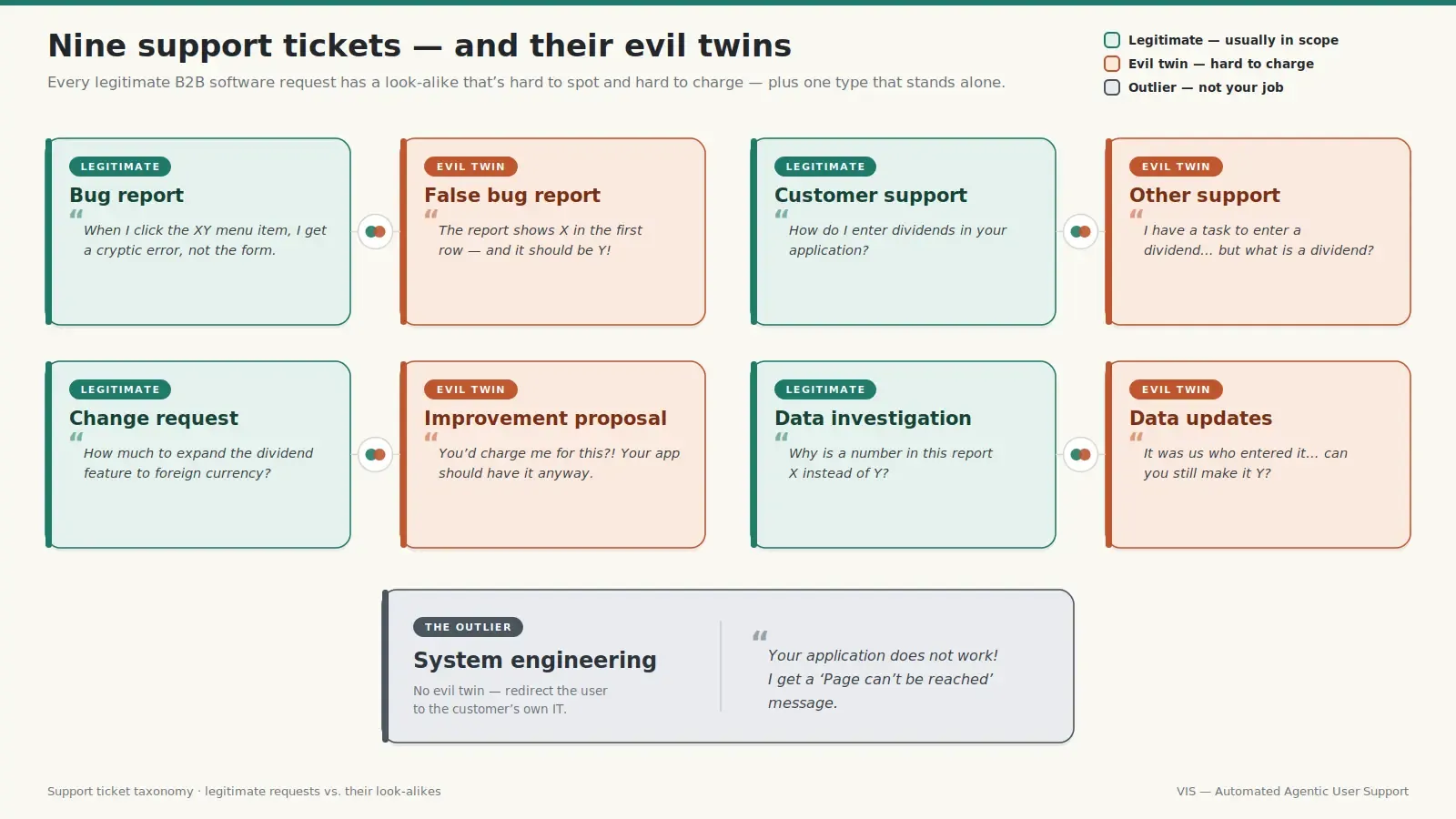
Bug reports and their evil twin, false bug reports
- "When I click the XY menu item, I get this rather cryptic error message instead of the form I am expecting." This type of support request is clear, and we call it a bug report. Most of the companies are supposed to solve them in their maintenance / subscription agreement. However, more often than not, support requests are not so clear and straightforward. Let us look at the evil twin of the bug report next.
- "The report shows X in the first row and it should be Y!" Looks like another bug report, right? You would be surprised how often it is not. After tedious data lineage investigation you might find out that Y was entered by the users. Sometimes by the very same user reporting the issue. Lacking better wording, let us call this support type false bug report. Fake bug reports come in many different forms. Sometimes users claim that something is wrong - only to find out this wrong behaviour exactly follows their specification. And it is very hard to tell if the bug report is fake before tedious investigation. To make it worse, charging for such work can be politically very sensitive. In other words, companies often do this dirty and disgusting work for free.
Customer support versus 'other support' outside contract scope
- "How do I enter dividends in your application?" This is another typical support type called, well, customer support. Many companies provide it in their contracts, and I would warmly recommend that you include it in your subscription / maintenance price calculation. Simply because it is hard to avoid. Luckily, it is also the perfect case for agentic AI. We've built customer support automation into our own internal systems, and the pattern is clear: give the AI access to documentation and software properly – and you will train a support agent in no time.
- "I have a task to enter a dividend in your app… But what is a dividend?" Although rarely it will be so clearly formed (it might come as follow up to the question from the previous bullet), such issues also happen often. In this case, the customer employee basically asks us to teach him his job, not how to use the software. How do we call this evil twin of customer support? To shorten the phrase "support out of contract scope" - lets call it other support. Besides teaching them their own work, it can include teaching them basic computer literacy, such as zooming into a browser where they see your solution. Once I even explained to a client how to round decimal numbers! Again, except being difficult to spot at first, this kind of support is also very difficult to charge. Luckily, LLMs are surprisingly good at such common knowledge questions. They can save your engineers tons of time and frustration.
Change requests versus improvement proposals
- "How much would it cost me if you expanded your dividend functionality to cover foreign currency?" We call this a change request and companies generally gladly do it since it brings them money. They might be first initiated via support - and sometimes we choose to keep it there until the costs are estimated and accepted by the user. As always, this ticket type has an evil twin.
- "Really, you would charge me for the development of the dividend in foreign currency!? This is something which your app should have anyways, and you could sell it to other clients in exchange for our specs." Perhaps not so aggressively, but clients often try to get some development at no charge. Doesn't matter if they don't have the budget or the employee asking is just too low in the hierarchy to approve the budget - they will still try to literally beg for functionalities which would make their lives easier. We call it an improvement proposal. They normally end up at some low priority list, unless a lot of customers are asking for it (or the solution architect believes it would really be a great improvement). However, even such a "customers-begging-pro-bono-work" list needs to be administered by someone. Or nowadays, by something.
Data investigation and data updates
- "Why is a number in this report X instead of Y?" This one is another example of ticket types which are not explicitly part of the contracts, but they are regularly done by the companies providing support. Why? Well, it might be a bug, can't it? In most of the cases you will spend time on data lineage investigation, often done by your engineers, just to find out X is exactly the value supposed to be in this report in the first place. Let us call this support type data investigation.
- "Uff, I understand, it was us who entered data which resulted in X after accounting processing… Can you still make it Y? Y is the correct value, and repeating the accounting stuff would take us a lot of time." If data investigation from the previous bullet is another evil twin of bug report, this one is the evil twin's really mean twin. We call it data updates - literally cleaning up customer sludge. Perhaps you will be able to charge a little for doing it - but by all means, keep the engineers who do it outside the customer's direct reach. It should still go through proper support and maintenance channels, otherwise your engineer's desktop will become a support desk in no time.
System engineering issues reported as application bugs
- "Your application does not work! I get this 'Page can't be reached' message." My favorite evil twin of bug request - system engineering! This is a typical source of your staff frustration. "Why are they even contacting us!? Their browser obviously can't reach the server! Why don't they contact their system support?!" And all this emotional storm will probably end up in a polite message: "It seems your workstation can't reach the server. Please contact your system support."
Which support tickets should an AI agent take over first?
Our last example tells all. The customer sees the application not working - and they report a "bug" to you. You immediately see it is a networking issue - not your job (unless you are their system support as well). How to minimize the damage of spending time on somebody else's job, while keeping the customer happy?
The answer is straightforward though implementation is not so easy - AI. LLMs are great at common knowledge tasks such as spotting networking issues from our example. Or answering common knowledge questions - such as those from our example for other support. Actually you can leave a lot of stuff clearly outside of contract scope to the first line AI support. System engineering, other support and improvement proposals from our list are clear examples.
What guardrails does an AI support agent need before it touches a customer?
The pitfalls? It is in LLM's nature to try to explain to the user asking for help how he can solve the problem himself. It can immediately kill your support automation. If the request is something you should legitimately solve - and the AI explains to the users how he can solve the problem - it could result in a lot of anger and political issues. The agent should be made very aware of its role, through mechanisms such as system prompts and guardrails. Even if it is outside of contract scope - such as system engineering - it should point them out to their system support. Not explain to an accountant how to troubleshoot networking issues.
When it comes to other support - such as discussing issues from their own work - then and only then the agent can help the user help herself. It is still not your job and it will still cost something. But I'd choose cents of API calls to hundreds of euros of spent personnel time every single time.
Even if the agent knows what it is supposed to do, another thing it will try: solve stuff without really understanding the underlying issue. Business users are notorious for their cryptic communication and skipping context altogether. You will need to force the agent to understand what the user is talking about - while at the same time avoiding biblical lengths in its answers. Business users will certainly not bother to read that.
Is a per-customer support agent worth building instead of using generic LLM knowledge?
The same goes for legit customer support. But here you might want to spend a bit more, developing a specialized agent for each customer. An agent with access to the documentation and perhaps even the software front-end. In this case you don't want generic common knowledge from LLMs training set. You want true solutions to customers' questions, custom tailored to your own world.
Can genuine bug reports be automated with a coding agent?
Can the legit support types, such as bug reports, be also automated?
If you are using coding agents, such as Claude Code or OpenAI Codex, you are probably doing it already. You just need a little bit more of automation - such as passing the bug report directly to Claude without a human intermediary. Humans should review and approve the changes done by the AI, not forward messages.
What happens when a coding agent receives a false bug report?
What about false bug reports? The answer is still yes, but it is way more painful this time. The LLMs are generally trained to please humans - so the coding agent will naturally try to "solve" the fake bug rather than arguing with the customer.
Let me give you an example – in the early days of our internal support automation, I surprised the agent with a simple bug report. Our corporate AI assistant stopped working. Why? Well, I changed the OpenAI API key it was using. How did Claude respond to my "bug" report? With a huge pull request changing really a lot of code. What these changes did I don't have a clue, since I never approved the pull request.
Once again, it can be done but it's not easy. It requires a lot of know-how and experience in developing agentic workflows. The agent should be very aware of its role, functional specifications, customer intent and a lot of other things. Otherwise, it will just blindly suck up to the user instead of returning a proper solution. In the case of a false bug report it should be an explanation why the behavior is not a bug, rather than changing the code base. If you don't pay attention to such details, the agent might end up doing change requests for free, potentially killing your business model in the process.
Why should change requests stay in human hands?
When it comes to change requests, in this case you will not want it fully automated. After all, you will want to estimate the price. It should by all means cover your costs, be profitable while at the same time not reject the customer. At the moment it still requires human touch. Tomorrow, with the rate of technological change we witness, who knows? Maybe my company will be more profitable when I stop determining pricing and hand it over to the machine.
How can an AI agent investigate and fix production data without endangering it?
What do we have left? Data investigation and data updates. If you need to give that kind of support to your customers, it can definitely be automated. The agents are actually quite good at understanding data models, writing queries and interpreting the results. If provided with proper context, of course.
One tip I can give you here - give the agent as little access to the production as possible. It might require human assistance such as VPN approval, and even more importantly, you don't want the agent to mess with production stuff without supervision.
Let me give you an example. With one of our customers, we are responsible for database backup and recovery. If the support request is to check the recent data, the only thing the agent does on production is download the latest backup. It then restores it on the test database, and analyzes the data there. Such an approach has an extra side-benefit - testing our backup-recovery procedure.
If something needs to be updated - the agent sends the SQLs to humans. After all, it is humans who should take responsibility for any changes in the production environment.
Does support automation work if you are not a software company?
If you are thinking about automating your support, I think the tips and lessons learned above should be enough to get you going.
But what if you are not a software company? As long as your support and maintenance is mostly done in digital format, not literally by hands, the same principle applies. Give the agent enough context, tools, and you are ready to start. To finish, you'll need a lot of patience when tuning the agent on the test set - iteration by iteration. Or you can leave it all to professionals - your choice.
Interested in more topics on AI automation? Subscribe to our newsletter and make sure you'll never miss one.
Automation verdict by support ticket type
| Ticket type | In contract scope? | Automation verdict |
|---|---|---|
| Bug report | Yes | Pass to coding agent; human approves the change |
| False bug report | No, usually done free | Automatable, hardest case; output is an explanation, not code |
| Customer support | Usually yes | Per-customer agent with documentation access |
| Other support (out of scope) | No | First-line AI; help the user help themselves |
| Change request | Paid work | Keep human — pricing needs judgement |
| Improvement proposal | No | First-line AI triage and backlog administration |
| Data investigation | Rarely, done anyway | Agent works on a restored backup, not production |
| Data updates | Sometimes billable | Agent drafts SQL; a human executes it |
| System engineering | No | First-line AI redirects to the customer's own IT |
If you're running a B2B software company, you almost certainly have a support backlog that looks like the nine types we've just walked through. The same almost certainly goes for IT departments in large enterprises. The next articles in this series will dig into the ones we got wrong – the guardrails that backfired, the agents that needed rebuilding, and how the real wins came from automating the unsexy stuff first, not the headline features. Subscribe to the newsletter and you'll see them as they land.
Frequently asked questions
Answers to the most frequently asked questions.
For out-of-scope tickets the trade is cents of API calls against hundreds of euros of engineer time, which is why VIS routes system engineering, out-of-scope questions and improvement proposals to first-line AI before anything else. The cost that matters is not the model bill but the engineering time spent building role awareness and guardrails, and that is a one-off. Legitimate customer support is worth spending more on, because a per-customer agent with documentation access is a build, not a subscription.
For ticket types that fall outside contract scope it can. System engineering issues, out-of-scope questions about the user's own job, and improvement proposals can be closed by a first-line agent without an engineer ever seeing them. The condition is that the agent knows which category it is in: for a networking issue it must redirect the user to their own system support, not walk an accountant through troubleshooting.
Yes, if it is not constrained. LLMs are trained to please the user, so a coding agent handed a false bug report will try to 'solve' it rather than argue — and a change request handed to the same agent will simply get built. VIS keeps pricing decisions human for exactly this reason; an agent that performs change requests for free can destroy the business model it was meant to protect.
As little as possible. In one VIS engagement where VIS is responsible for database backup and recovery, the agent's only production action is downloading the latest backup; it restores that to a test database and does all analysis there, which as a side effect continuously tests the recovery procedure. When data must change, the agent produces the SQL and a human executes it.
A generic chatbot answers from the model's training set; a support agent has to answer from your documentation, your functional specification and sometimes your software front-end. It also has to be forced to establish what a business user actually means before answering, and to answer briefly enough that they read it. VIS builds this per customer rather than as one generic bot.
Longer than the first working prototype suggests. The build is fast; the reliability comes from patiently tuning the agent against a test set of real tickets, iteration by iteration, until it stops explaining problems back to users and stops closing tickets it has not understood. VIS runs its own support automation internally, which is where the failure modes in this article came from.
VIS runs internal support automation and its own corporate AI assistant, and the false bug report test described here was run against that internal system. Client work uses the same patterns — first-line AI on out-of-scope tickets, coding agents on genuine bug reports, restore-to-test for data investigation — scaled to the customer's environment.
Tags